What’s the real deal with best video baby monitors with split screen?
Split screen baby monitors sound like a no-brainer for parents juggling two kids or multiple rooms, but many models drop the ball on image quality, lag, or ease of use. The key isn’t just having multiple cameras—it’s how well the monitor handles them side-by-side without glitching or confusing controls.
This guide cuts through the fluff and shows you the best video baby monitors with split screen in 2026 that actually deliver sharp, reliable views from two cameras simultaneously.
🔝 Top Picks at a Glance
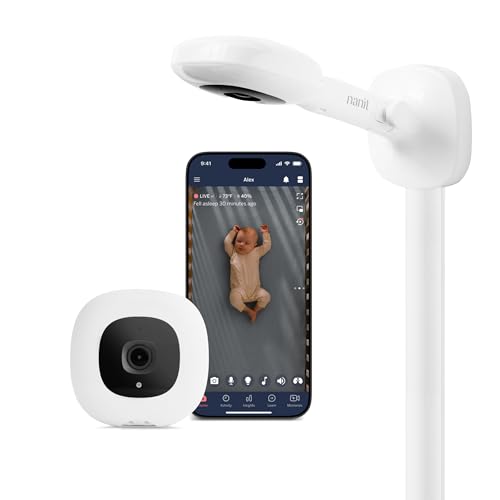
Nanit Pro Smart Baby Monitor with Split Screen
Top-tier video clarity and smart sleep tracking with seamless split screen for twins or large nurseries. Best for tech-savvy parents wanting app integration.

Motorola MBP867CONNECT Video Baby Monitor with Split Screen
Reliable, affordable split screen monitor with good range and two-way talk. Ideal for parents who want solid basics without subscription fees.
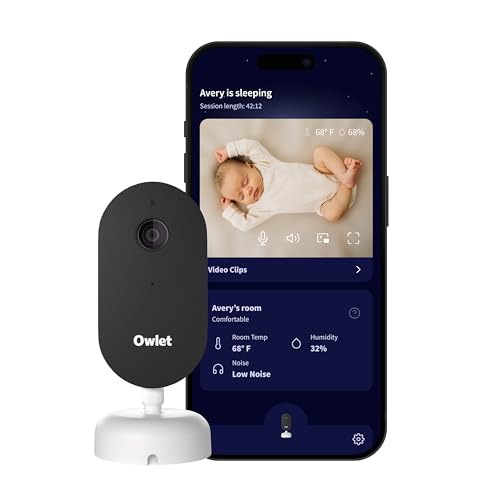
Owlet Cam Smart Baby Monitor with Split Screen Capability
Premium video quality and smart alerts with split screen via app. Best for parents wanting long-term investment in connected baby tech.
🧠 What to Look for Before You Buy
Not all split screen baby monitors are created equal. Many parents assume more cameras automatically equal better coverage, but software glitches, poor video quality, or laggy feeds can make you question the whole setup. It’s not just about the hardware—how the monitor manages multiple feeds simultaneously is where many models stumble.
Video Quality and Latency
Split screen means you’re watching at least two camera feeds at once, so each feed gets less screen real estate and processing power. Look for monitors with at least 720p resolution per camera to avoid grainy or pixelated images. Lag is a killer here—if your screen freezes or delays, you miss critical moments. For example, the Nanit Pro maintains crisp, real-time video even in split screen mode, unlike cheaper monitors that drop frames or blur.
Number of Cameras and Expandability
Some monitors come with two cameras out of the box, others allow you to add extras. If you have twins or want coverage for nursery plus playroom, expansion matters. But beware: some brands limit split screen to two cameras max, while others let you cycle through more. Also, check if adding cameras requires subscriptions or hidden fees—our Best Baby Monitor Without Subscription (No Monthly Fees – 2026) guide is a good place to cross-check.
Connectivity and Range
Split screen monitors tend to be more bandwidth-heavy. WiFi models offer app integration and remote viewing but can drop off if your network is spotty. Non-WiFi options often boast longer range and fewer security concerns—see our picks in Best Non-WiFi Baby Monitor With Long Range (Reliable Video Picks 2025). Note that range claims are often inflated; test in your home layout if possible.
User Interface and Controls
A good split screen monitor won’t make you wrestle with complicated menus. Switching between cameras, zooming, or toggling audio should be intuitive. Some monitors let you lock both feeds on screen, others force you to flip through single camera views. Practical tip: if you can, try the monitor’s interface via demo videos or in-store to see if it clicks for you.
If you’re juggling twins or two rooms, also check out our detailed breakdown of Best Baby Monitor with Two Cameras (2026) — Split Screen & Twin Nurseries for more options.
🟦 Nanit Pro Smart Baby Monitor with Split Screen — Best Overall
Nanit has built a reputation for combining crystal-clear video with smart sleep insights. The Pro model stands out by offering real-time split screen on its dedicated monitor and mobile app, with 1080p clarity and night vision that actually works. Unlike many competitors, it includes built-in sleep tracking and breathing motion monitoring without extra gadgets.
Who it's for
Parents who want a high-tech monitor that can handle twins or multiple rooms without compromising video quality or usability. Also great for those wanting detailed sleep data alongside monitoring.
Real-world performance
The Nanit Pro delivers sharp, lag-free video whether you’re on split screen or full screen. Its wall-mounted cameras provide stable angles and the app’s split view keeps both babies in sight without fuss. The sleep tracking is a nice bonus but can sometimes flag false alarms. Battery life on the monitor unit is solid, and the two-way talk feature works well. Downsides? It’s WiFi-dependent, so if your connection is flaky, expect hiccups. And the price is on the high side.
Value assessment
You pay a premium but get a premium product that’s more than just a camera—think of it as a multi-tool for monitoring and sleep coaching. If you want to skip subscriptions, check our Best Baby Monitor Without Subscription (No Monthly Fees – 2026) for comparable picks.
Verdict: The Nanit Pro is the most reliable, feature-packed split screen monitor that justifies its price for parents who want both tech and trust.
🟩 Motorola MBP867CONNECT Video Baby Monitor with Split Screen — Best Budget Option
Motorola’s MBP867CONNECT offers the essentials: solid video, two-camera split screen, and decent audio—all without breaking the bank or locking you into a subscription. It’s a tried-and-true favorite for parents who want dependable tech without bells and whistles.
Who it's for
Parents on a budget who want a straightforward split screen monitor for two kids or rooms but don’t need fancy app tracking or extra sensors.
Real-world performance
The image quality is good but not stunning—720p does the job, and night vision is clear enough. The range is decent for most homes, and the app connectivity is surprisingly stable. Two-way talk works well. Downsides include a plastic-feeling monitor unit and occasional app glitches. The split screen view is basic but effective.
Value assessment
For under $200, this monitor delivers reliable video feeds and split screen without subscription fees. It’s not fancy, but it’s solid. If you want better app integration or sleep data, you’ll pay more. This makes it a great starter or a backup system.
Verdict: Motorola MBP867CONNECT is the no-nonsense, affordable split screen monitor that covers the basics without surprises.
🟨 Owlet Cam Smart Baby Monitor with Split Screen Capability — Best Long-Term Investment
Owlet’s Cam has grown into a high-end baby monitor with sharp 1080p video, smart alerts, and reliable split screen viewing via its app. It’s designed to grow with your family, offering features like background audio, temperature sensing, and integration with Owlet’s Sock for vital signs.
Who it's for
Parents who want a future-proof baby monitor with smart home integration and plan to use it for multiple children or rooms over several years.
Real-world performance
Owlet Cam’s video quality is excellent, and the app’s split screen mode is smooth and intuitive. The alert system is responsive, and the device’s build quality feels premium. Compared to our top pick Nanit Pro, Owlet’s interface is less polished, and you need a subscription for some advanced features. Range is WiFi-dependent, so network quality matters.
Value assessment
The upfront cost is high, and add-ons can push the price further. However, its expandability and smart features justify the investment for parents who want more than just video. It holds resale value well, thanks to the brand’s reputation.
For a deeper dive into smart baby monitors, check out Best High-Tech Baby Monitors with App Integration (2026) – Expert Picks for Smarter, Safer Infant Monitoring.
Verdict: Owlet Cam is a smart, versatile investment for parents committed to tech-enabled baby monitoring long-term.
📊 Side-by-Side Comparison
Nanit Pro Smart Baby Monitor with Split Screen
- 1080p HD video per camera
- Integrated sleep tracking
- Seamless split screen on monitor and app
Motorola MBP867CONNECT Video Baby Monitor with Split Screen
- Affordable price
- Two-way talk
- No subscription fees
Owlet Cam Smart Baby Monitor with Split Screen Capability
- 1080p HD video
- Smart alerts
- App-based split screen and integration
*Prices are approximate and may change. Always check the live price on Amazon before buying.
✅ Our Recommendation
If you want the clearest, most reliable split screen video with smart features and aren’t afraid to invest, go for the Nanit Pro. For parents who want dependable basics without subscription fees or high price, the Motorola MBP867CONNECT hits the mark. If you want a premium, future-proof monitor that grows with your family and integrates with smart home gear, Owlet Cam is your pick.
- Best overall: Nanit Pro Smart Baby Monitor with Split Screen — sharp video and smart sleep data without compromise.
- Best budget pick: Motorola MBP867CONNECT — solid, reliable, no-frills split screen at a great price.
- Best long-term value: Owlet Cam Smart Baby Monitor — premium features and expandability for years of use.
❓ Frequently Asked Questions
Can I use split screen baby monitors for more than two cameras?
Most split screen monitors limit you to two cameras visible at once, but some apps let you cycle through additional camera views. If you need constant multi-room coverage beyond two cameras, look for monitors explicitly supporting multiple feeds or consider setups like the ones in our Best Baby Monitor with Two Cameras (2026) — Split Screen & Twin Nurseries.
Are split screen monitors safe in terms of data privacy?
WiFi-enabled baby monitors carry some risk of hacking if not properly secured. Choose brands with end-to-end encryption and regular firmware updates. Non-WiFi options, like those covered in our Best Non-WiFi Baby Monitor With Long Range (Reliable Video Picks 2025), reduce these risks but often lack app features.
Does split screen affect video quality?
Yes, splitting the screen means each camera’s feed is smaller and can sometimes reduce resolution or frame rate. The best models like Nanit Pro maintain HD video quality per feed, but budget options might show more pixelation or lag.
When should I upgrade from a single-camera monitor to a split screen model?
If you have twins, multiple bedrooms to watch, or want simultaneous views of your baby and a play area, it’s time for split screen. Otherwise, a high-quality single camera might suffice. For more on multi-camera setups, see Best Baby Monitor with Two Cameras (2026) — Split Screen & Twin Nurseries.
Can I use split screen baby monitors without a WiFi connection?
Some monitors offer split screen on dedicated parent units without WiFi, but many rely on WiFi for app access and multiple streams. If you want non-WiFi options with reliable range, check our Best Non-WiFi Baby Monitor With Long Range (Reliable Video Picks 2025).